ARTWELL / CASE STUDY

UX/UI Portfolio · Stakeholder Presentation · 2026

ARTWELL Experience Ecosystem

ฉันออกแบบประสบการณ์ดิจิทัลที่เชื่อมการค้นพบนิทรรศการ การลงทะเบียน ปฏิทินกิจกรรม Mind Reflection และเครื่องมือหน้างาน โดยระบบหลักได้เผยแพร่ใช้งานจริงบน production แล้ว

CASE 01 / ARTWELL EDITION 01

Project overview

From Exhibition Website
to End-to-End Service

ฉันตีความโจทย์ใหม่จาก “เว็บไซต์ประชาสัมพันธ์นิทรรศการ” เป็น “service ecosystem” และนำ public experience ขึ้น production ที่ artwellexhibition.com เพื่อให้ผู้ชมค้นพบงาน ลงทะเบียน วางแผนกิจกรรม และต่อยอดประสบการณ์ได้จริง

ARTWELL Edition 01:
anapanasati

นิทรรศการ immersive art & design ที่ River City Bangkok ระหว่าง 10 สิงหาคม–28 กันยายน 2026 ถ่ายทอดแนวคิด “Return to Self” ผ่านเส้นทางประสบการณ์ 8 โซนและกิจกรรมด้าน sound, meditation, aroma และ workshop

My contribution
วาง UX strategy, IA, service flow, responsive UI system และวิธีตรวจ visual QA
Design objective
รักษาความสงบของแบรนด์ โดยทำให้ทุก transaction ชัดเจนและตรวจสอบได้
Business context
นิทรรศการมีทั้งผู้ชมทั่วไป ปฏิทินกิจกรรม งานหน้างาน และ recurring edition ที่ต้องขยายต่อได้
Key constraint
ต้อง deploy บน production hosting ด้วย PHP/MySQL โดยไม่พึ่ง framework หรือ build pipeline
LIVE

production website พร้อม canonical domain และ public registration

146

activity sessions ที่แสดงบนปฏิทิน production ระหว่างสองเดือน

11

activity formats ครอบคลุม Sound, Meditation, Aroma และ Workshop

28

วันที่มีกิจกรรมใน live calendar สำหรับช่วยผู้ชมวางแผนการมาเยือน

Production surfaceStatus verifiedStakeholder evidence
Exhibition story & general registrationLiveHomepage, event information, FAQ and registration form load on the production domain
Activity CalendarLive146 sessions, 11 activity formats and 28 active dates are visible
Mind ReflectionLive10-question experience and clear non-diagnostic framing are available publicly
Registration Admin & Check-inProtected live entryAuthenticated staff entry points are deployed; no production data was accessed
Activity booking, payment & reviewDesigned / stagedDocumented in this case study; transactional routes are not presented as publicly live

Stakeholder alignment

Designing
for Shared Value

ก่อนออกแบบหน้าจอ ฉันแปลงความต้องการของแต่ละฝ่ายให้เป็น design criteria ชุดเดียว เพื่อให้การตัดสินใจไม่ถูกขับเคลื่อนด้วยความสวยหรือความเร่งด่วนของฝ่ายใดฝ่ายหนึ่งเท่านั้น

01 / BRAND

Brand & Creative Leadership

ต้องการประสบการณ์ที่สะท้อนความสงบ ความร่วมสมัย และคุณค่าของ ARTWELL

Design response
Editorial storytelling + monochrome visual language
Value
สร้าง brand consistency โดยไม่ลดความชัดเจนของข้อมูล
02 / AUDIENCE

Visitors & Participants

ต้องการรู้ว่างานคืออะไร เลือกรอบได้จริง และมั่นใจว่าการจองสำเร็จในสถานะใด

Design response
Progressive disclosure + guided booking + explicit feedback
Value
ลดความลังเลและป้องกัน dead-end ระหว่างการจอง
03 / OPERATIONS

Admin & On-Site Staff

ต้องตรวจรายการจำนวนมาก อนุมัติอย่างถูกต้อง และจัดการคิวหน้างานภายใต้เวลาจำกัด

Design response
Comparison-first tables + secure states + high-contrast scanner
Value
ทำให้ตัดสินใจเร็วขึ้นและลดความคลุมเครือหน้างาน
04 / GROWTH

Partners & Future Editions

ต้องการระบบที่รองรับ media, collaborators และ edition ถัดไปโดยไม่ต้องสร้างใหม่ทั้งหมด

Design response
Separate pathways + reusable components + scalable data states
Value
วางรากฐานให้ ARTWELL เติบโตในฐานะ recurring cultural IP
Shared decision criteriaEmotion: ต้องรู้สึกเหมือน ARTWELLClarity: ทุก action ต้องเข้าใจได้Operability: ทุก state ต้องจัดการต่อได้

The challenge

How can “calm and immersive” coexist with a system that must be “fast and precise”?
01

A Wealth of Content Without Losing the Visitor

ฉันจัดลำดับ brand, exhibition, designers, product, calendar และ FAQ ตามคำถามที่ผู้ชมต้องตอบก่อนตัดสินใจ แทนการวางทุกเนื้อหาให้มีน้ำหนักเท่ากัน

02

Multiple Booking States and Payment Paths

ฉันออกแบบ capacity, โค้ดส่วนลด, PromptPay, slip review, approval และ rejection ให้เป็นภาษาของผู้ใช้ โดยไม่บังคับให้ผู้ชมเข้าใจศัพท์หลังบ้าน

03

On-Site Experiences Must Perform Under Pressure

ฉันลดสิ่งรบกวนใน scanner และให้ feedback ที่ชัดทันที เพื่อให้เจ้าหน้าที่ตัดสินใจได้เมื่อมีคิว แสงไม่แน่นอน และเวลาจำกัด

04

One Brand, Different Interaction Contexts

ฉันแยกความหนาแน่นของ public experience กับ dashboard แต่คง typography, tone และ status language ชุดเดียวกันไว้

My Design Process

กระบวนการถูกวางให้ stakeholder ตรวจสอบเหตุผลและตัดสินใจร่วมได้ในแต่ละช่วง ไม่รอเห็นเฉพาะหน้าจอสุดท้าย

01 / FRAME

Align the Problem

รวบรวม brand intent, business constraints, operational needs และระบบเดิมให้เป็นโจทย์เดียว

02 / STRUCTURE

Map the Service

แยก roles, journeys, IA, handoffs และ data states ก่อนออกแบบ visual direction

03 / DESIGN

Prototype the Flow

ออกแบบหน้าจอและ components ตามสถานการณ์จริงทั้ง public, admin และ on-site

04 / VALIDATE

Test the Evidence

ตรวจ responsive captures, text fit, state coverage และ visual QA แล้วปรับซ้ำจากหลักฐาน

Users & jobs to be done

One Ecosystem
Four Distinct Expectations

ฉันแบ่งผู้ใช้ตาม “งานที่ต้องทำให้สำเร็จ” เพื่อให้ IA, interaction และ system states ตอบบริบทจริงของแต่ละคน ไม่ได้ออกแบบจากมุมมองของหน้าเว็บเพียงอย่างเดียว

V

Exhibition Visitor

อยากเข้าใจว่างานนี้เหมาะกับตนเองหรือไม่ และวางแผนมาเยือนได้อย่างมั่นใจ

  • ค้นหาแนวคิด วัน เวลา สถานที่
  • ลงทะเบียนและรับ QR
  • รู้ว่าจะต้องเตรียมอะไร
A

Activity Participant

อยากเลือกรอบที่ยังว่าง ชำระเงินถูกยอด และรู้สถานะการยืนยันอย่างชัดเจน

  • เปรียบเทียบกิจกรรม/เวลา
  • ใช้ส่วนลดหรือ PromptPay
  • รับ ticket หลังอนุมัติ
S

Staff & Admin

อยากตรวจรายการ ตัดสินใจเร็ว และเช็กอินได้โดยลดความผิดพลาดหน้างาน

  • ตรวจสลิปและอนุมัติ
  • จัดการ discount codes
  • สแกนและติดตามสถานะ
M

Media Partner

อยากสมัคร preview day ด้วยข้อมูลวิชาชีพ และรับ media pass ที่พร้อมใช้

  • ส่ง profile/portfolio
  • เลือกช่วงเวลาและกิจกรรม
  • รับ QR pass เฉพาะบุคคล

Service ecosystem

Experience map

ฉันใช้ service map เพื่อทำให้ stakeholder เห็น journey ของผู้ชม งานปฏิบัติการ และระบบสนับสนุนในภาพเดียว รวมถึง handoff ที่มีความเสี่ยงระหว่าง digital touchpoint กับบริการหน้างาน

Information architecture

Separating Content
from User Tasks

ฉันแยก public discovery, transaction และ operational tools เป็นเส้นทางเฉพาะ เพื่อให้ navigation สั้นลง ลดข้อมูลที่ไม่เกี่ยวข้อง และควบคุมสิทธิ์ของแต่ละบทบาทได้ชัดเจน

Role-based sitemap

  • Public experience
    • Home / Exhibition story
    • Designers & product
    • Location & FAQ
    • General registration
  • Activity experience
    • Calendar & filters
    • Day schedule
    • Booking & payment
  • Personal touchpoint
    • QR ticket
    • Mind Reflection
  • Staff workspace
    • Registration admin
    • Activity review
    • Discount codes
    • Check-in scanner
  • Media pathway
    • Media application
    • Media pass
    • Media admin

Screen inventory

SurfacePrimary jobDelivery status
Main experienceเข้าใจนิทรรศการและลงทะเบียนเข้าชมLive
Activity calendarค้นหา session ตามวันและประเภทLive
Booking dialogเลือกกิจกรรม กรอกข้อมูล และชำระเงินStaged
QR ticketแสดงสิทธิ์เข้างานแบบ secret linkProtected flow
Check-in scannerตรวจ ticket และป้องกันใช้ซ้ำProtected live entry
Admin workspaceตรวจ registration และดูแล operationsProtected live entry
Mind Reflectionตอบคำถามและรับ personal reflection cardLive
Media workflowสมัคร preview และออก media passSeparate pathway

End-to-end flow

Booking to check-in

ฉันแบ่ง service blueprint เป็นหกช่วงและกำหนด feedback ในทุก handoff โดย flow นี้แสดง target experience ตั้งแต่เลือกกิจกรรมถึงเช็กอิน ขณะที่ production release ปัจจุบันเปิดใช้ public registration, calendar และ protected staff entry แล้ว

STEP 01

Choose an Activity

กรองจากปฏิทิน เปิดรายละเอียดวัน และเห็นจำนวนที่เหลือก่อนเริ่มกรอกข้อมูล

Calendar
STEP 02

Select a Session

ตัวเลือกวันที่และเวลาถูกจำกัดตาม catalog จริง พร้อม disabled state เมื่อเต็ม

Capacity API
STEP 03

Pay or Apply a Code

เลือกใช้ส่วนลด 100% หรือ PromptPay พร้อม QR ตามยอดและแนบหลักฐาน

Payment
STEP 04

Await Review

ระบบสร้าง reference และคงสถานะ pending review จนกว่าเจ้าหน้าที่ตัดสินใจ

Admin review
STEP 05

Receive the QR Ticket

เมื่อ approved ผู้ใช้ได้รับอีเมลและ secret ticket link ที่เปิดใช้ได้

Email · Ticket
STEP 06

Check In

เจ้าหน้าที่สแกน ตรวจสิทธิ์ และบันทึกเวลาแบบใช้ได้ครั้งเดียว

Scanner

Selected design work

Key screens
& design decisions

ฉันปรับความหนาแน่นและ visual hierarchy ตามบริบท: immersive เมื่อเล่าเรื่อง, guided เมื่อทำ transaction และ high-contrast เมื่อทำงานหน้างาน

01 / DISCOVERY

Exhibition storytelling

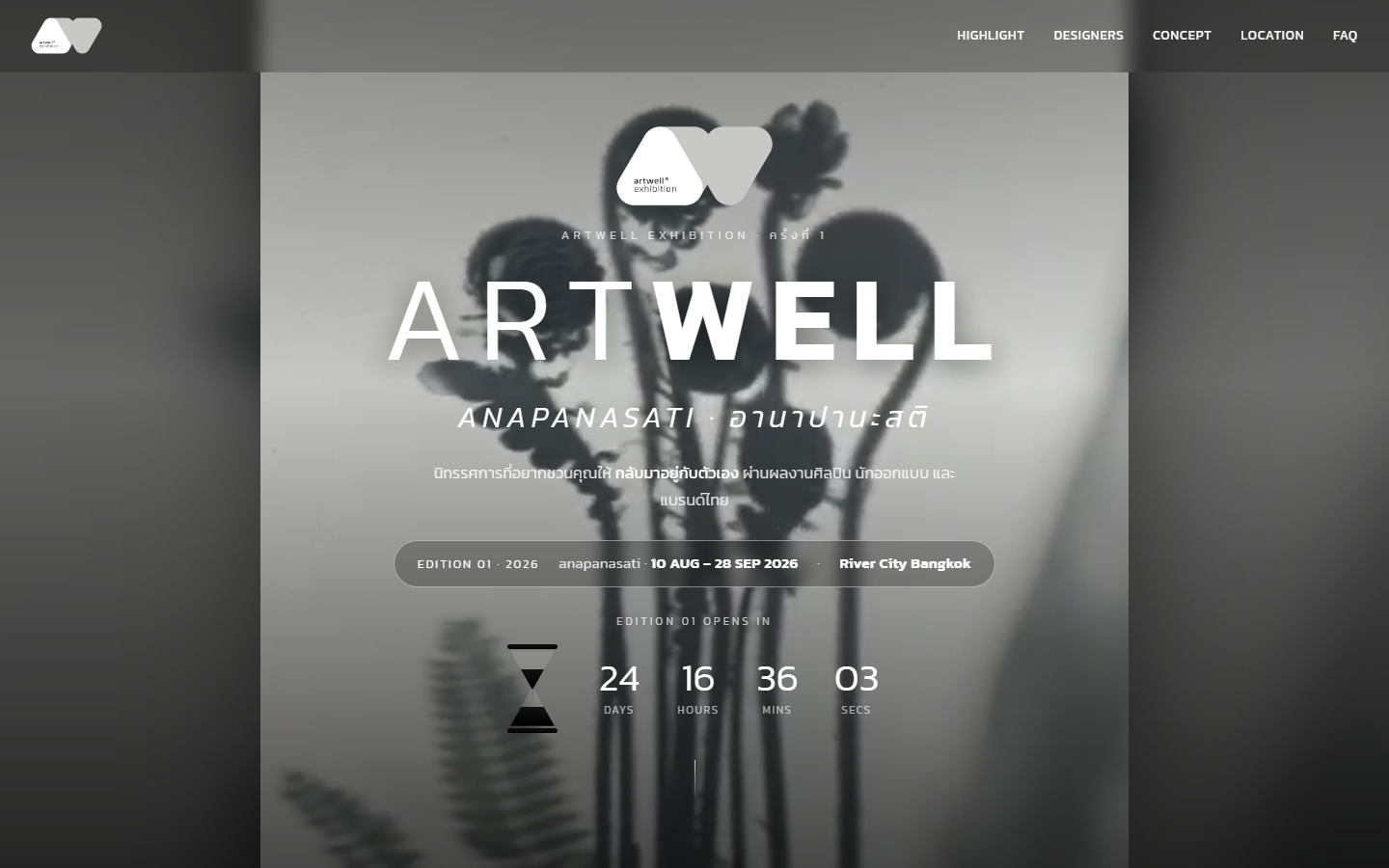
ฉันใช้ภาพขาวดำ พื้นที่ว่าง และลำดับตัวอักษรขนาดใหญ่เพื่อสร้างความรู้สึกสงบ ก่อนพาผู้ชมเข้าสู่รายละเอียดแบบ progressive journey แทนการวางข้อมูลทั้งหมดในระดับเดียวกัน

Progressive disclosureเริ่มจาก brand promise แล้วค่อยเปิด concept, journey, designers และ practical info
Editorial navigationเมนูสั้นและ anchor ตามคำถามหลักของผู้ชม
Brand-to-action bridgeวัน เวลา สถานที่ และ countdown ถูกวางใน first viewport
ARTWELL exhibition homepage hero on desktop
Desktop heroBrand, event detail and countdown in one viewport
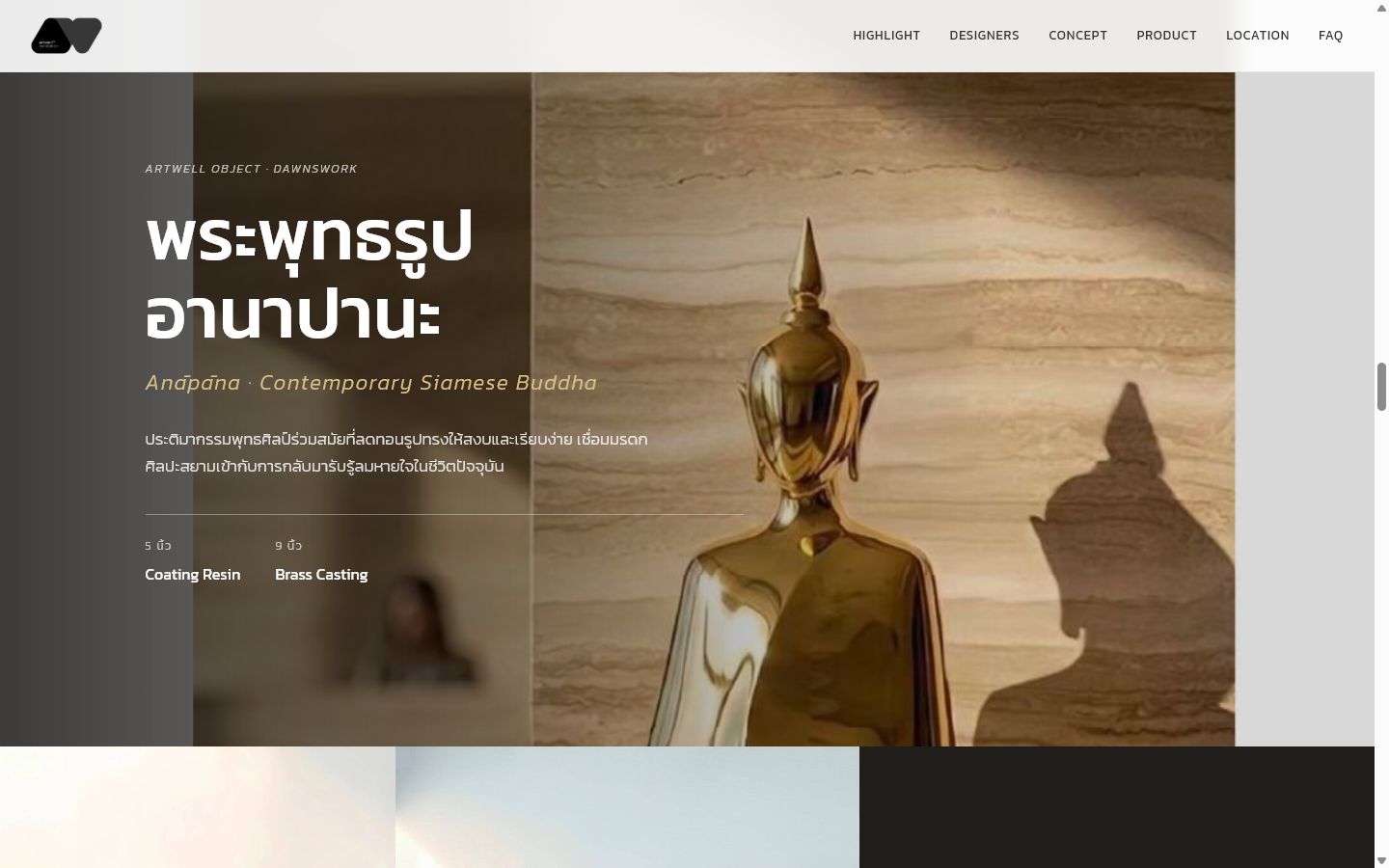
Anapana sculpture editorial product section
Editorial product storyObject narrative with material and scale
02 / PLANNING

Activity calendar

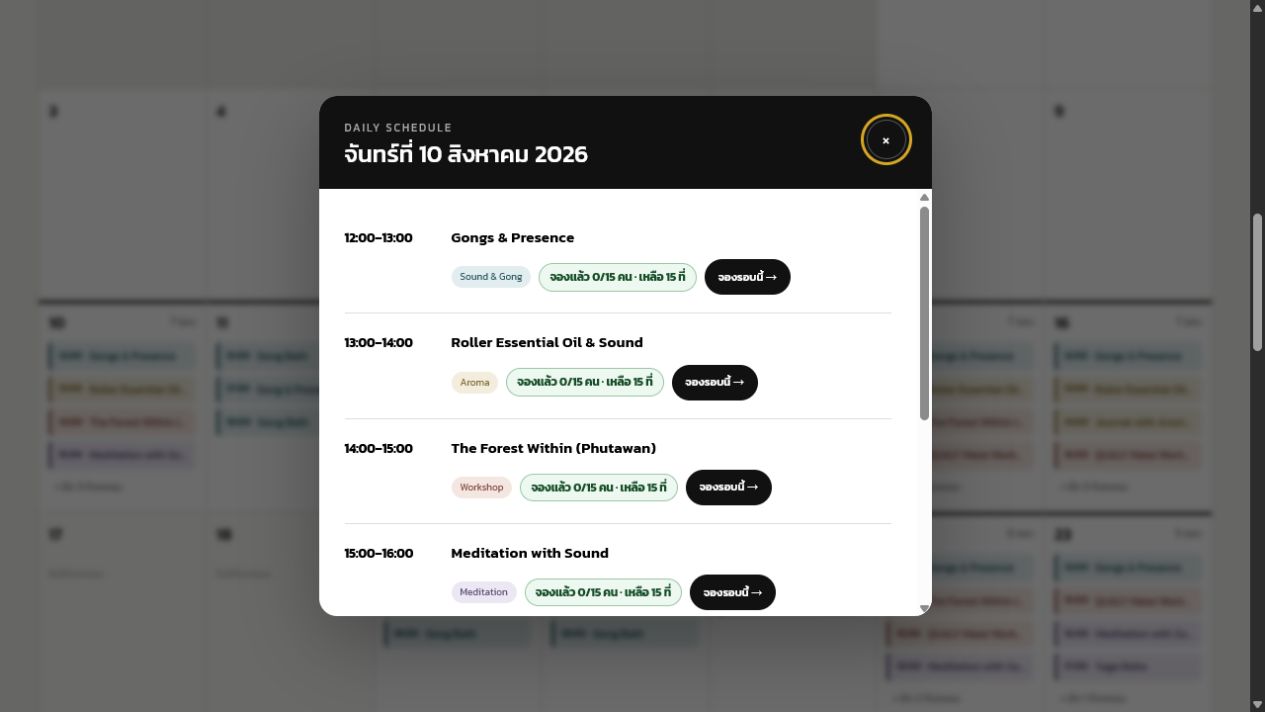
ฉันออกแบบปฏิทินให้ทำหน้าที่ทั้ง overview และ decision tool สีช่วยแยกประเภทกิจกรรม ขณะที่ text label ทำให้ข้อมูลยังเข้าใจได้โดยไม่พึ่งสีเพียงอย่างเดียว

Capacity at decision pointจำนวนที่เหลือแสดงตรงหน้ารอบ ไม่ซ่อนในขั้นตอนถัดไป
Consistent taxonomySound, Meditation, Aroma และ Workshop ใช้สีและชื่อเดียวกันทุกจุด
Full-state preventionรอบเต็มถูก disabled พร้อมข้อความอธิบาย ไม่ปล่อยให้กรอกจนจบแล้วค่อยแจ้ง
Production evidence

Live calendar แสดง 146 sessions, 11 activity formats และ 28 วันที่มีกิจกรรม พร้อมตัวกรอง 4 หมวดหลัก

Daily schedule dialog showing activities, categories and remaining capacity
Daily scheduleScan-friendly time, category and capacity
03 / TRANSACTION

Guided booking & payment

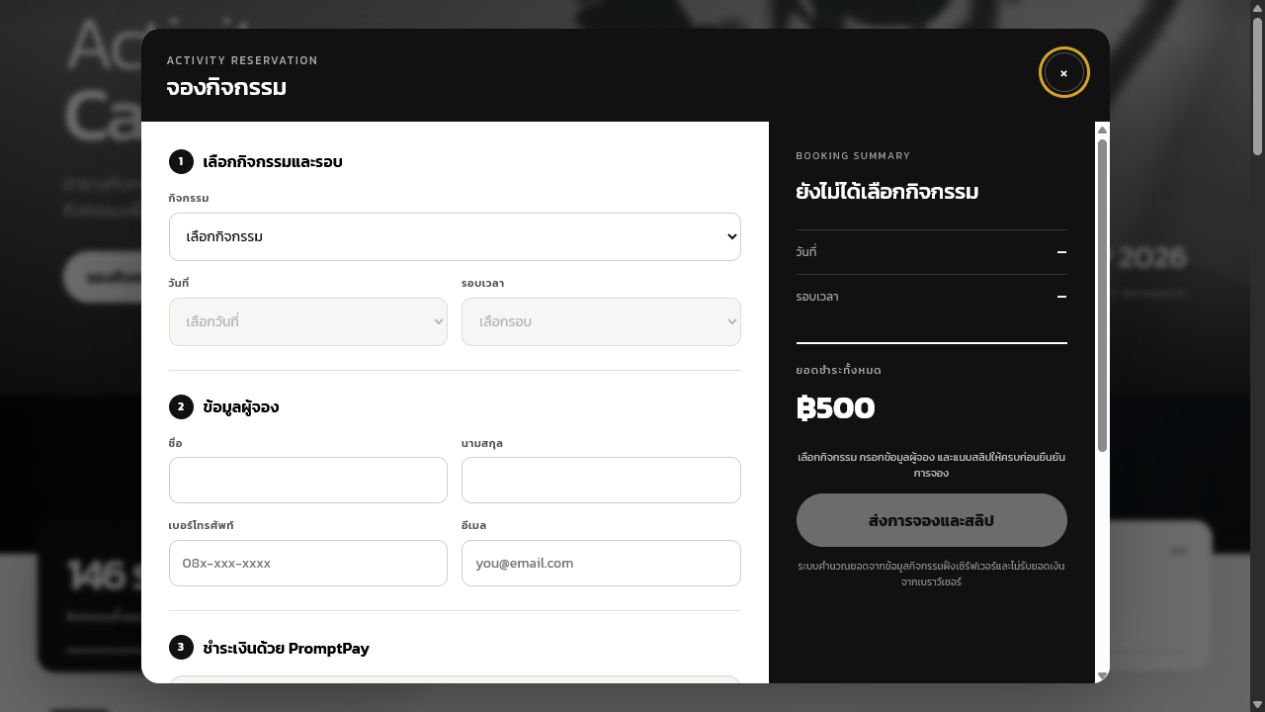
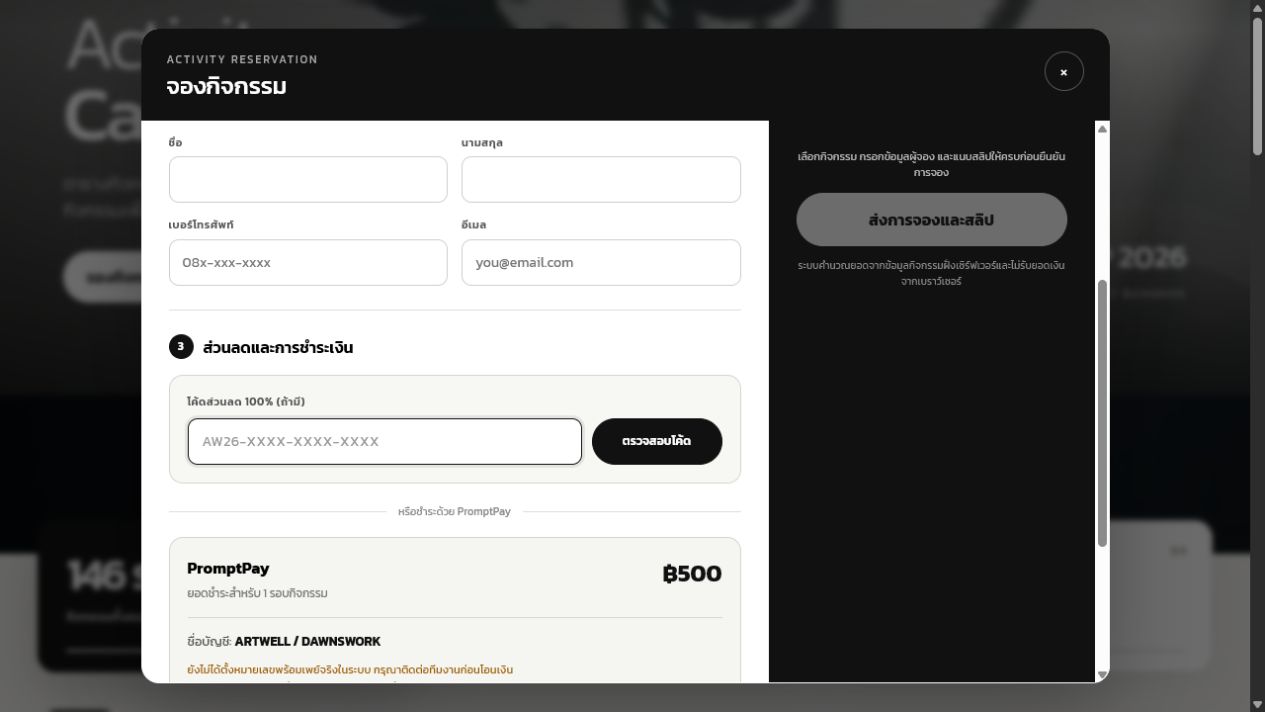
ฉันแบ่งฟอร์มเป็น 3 ขั้นตาม mental model ของผู้ใช้: เลือก session → ข้อมูลผู้จอง → ส่วนลด/ชำระเงิน และวาง booking summary คงที่ด้านข้างเพื่อช่วยตรวจสอบก่อนส่ง

Dependent inputsวันที่และรอบเปิดใช้งานตามกิจกรรมที่เลือก ลด invalid combinations
Two valid payment pathsโค้ด 100% ตัดขั้นตอนสลิป ส่วน PromptPay แสดงยอดและหลักฐานครบ
Explicit readinessCTA disabled จนข้อมูลสำคัญครบ พร้อม hint บอกสิ่งที่ขาด
Delivery status

Transaction flow นี้ผ่าน design และ visual QA แต่ยังระบุเป็น staged จนกว่า public booking routes จะเปิดบน production

ARTWELL activity booking form and summary
Booking formStep-based data entry
ARTWELL discount and PromptPay payment section
Payment decisionDiscount or PromptPay
Key microcopy principle

ระบบไม่ใช้คำว่า “สำเร็จ” ทันทีเมื่อรับสลิป แต่สื่อว่า “ส่งการจองแล้วและรอตรวจสอบ” เพื่อให้ความคาดหวังตรงกับกระบวนการจริงของทีมงาน

04 / OPERATIONS

Admin & payment review

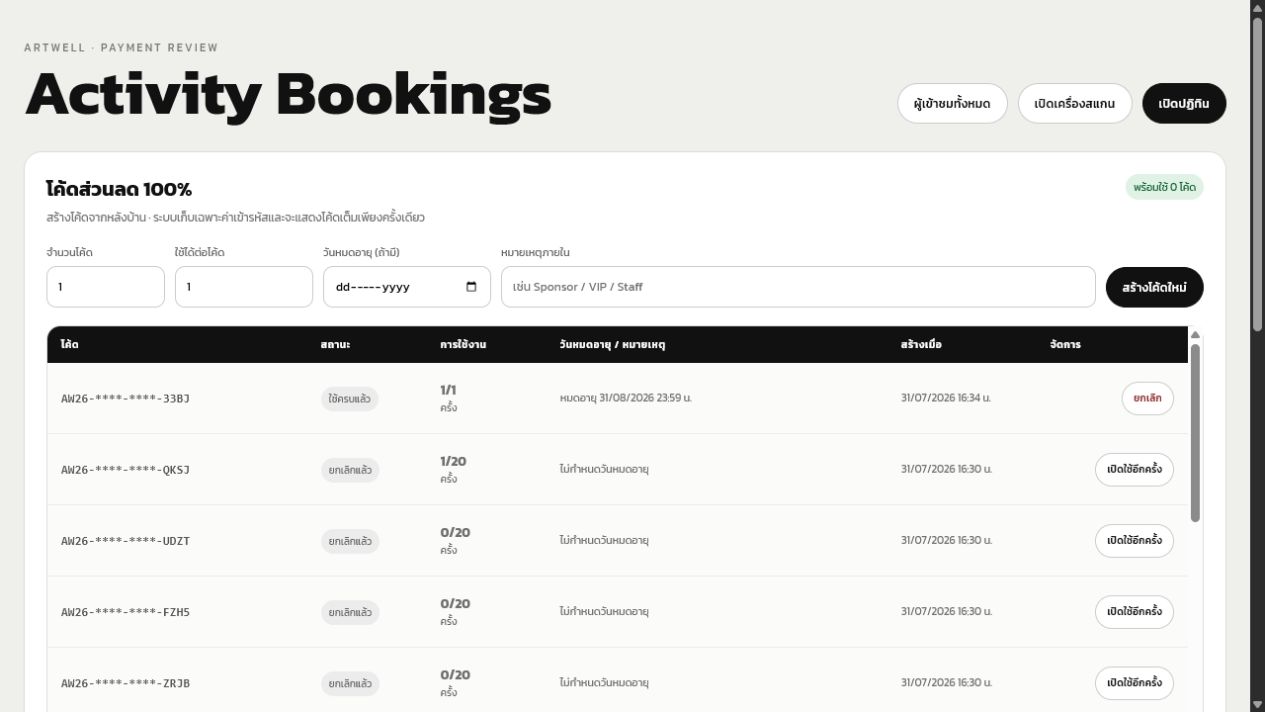
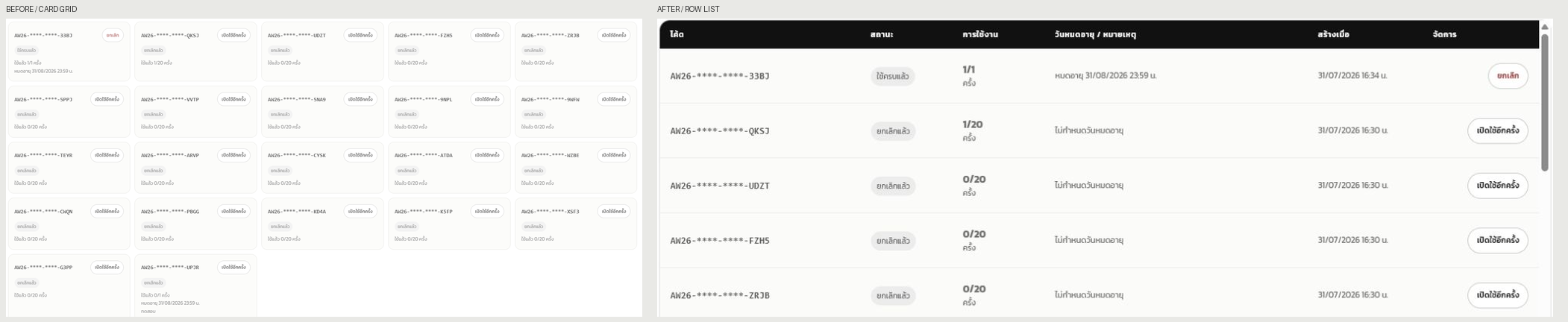
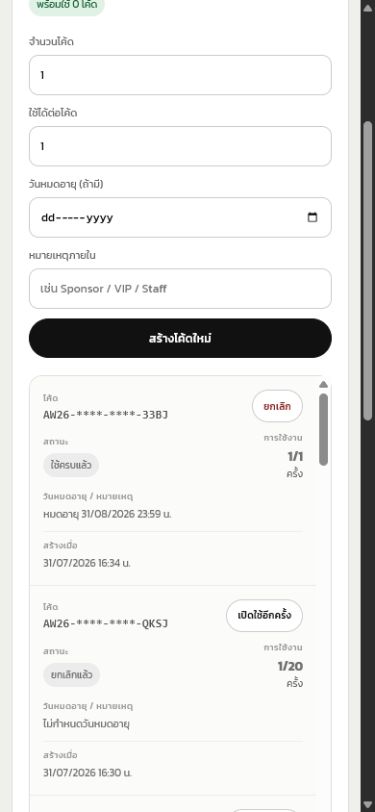
ฉันเลือกความหนาแน่นของข้อมูลเหนือภาพตกแต่งในหลังบ้าน และเปลี่ยน card grid เป็น row list เพื่อให้เจ้าหน้าที่เปรียบเทียบสถานะ การใช้งาน วันหมดอายุ และ action ข้ามรายการได้เร็วขึ้น โดย production ปัจจุบันมี protected entry สำหรับ Registration Admin ส่วน Activity Review ยังอยู่ใน staged scope

Fixed comparison columnsข้อมูลสำคัญอยู่ตำแหน่งเดิมในทุกแถว ช่วย scan แนวตั้ง
Operational safeguardsโค้ดที่ถูกใช้แล้วไม่สามารถลบ และ action สำคัญต้องผ่าน authenticated session
Responsive transformationตาราง desktop เปลี่ยนเป็น labeled summary rows บน mobile แทนการบีบคอลัมน์
Activity booking admin with discount code row list
Operational listDense, aligned and internally scrollable
Before and after comparison of admin discount code layout
Before / afterCard grid evolved into a comparison-first row list
05 / ON-SITE

QR ticket & check-in

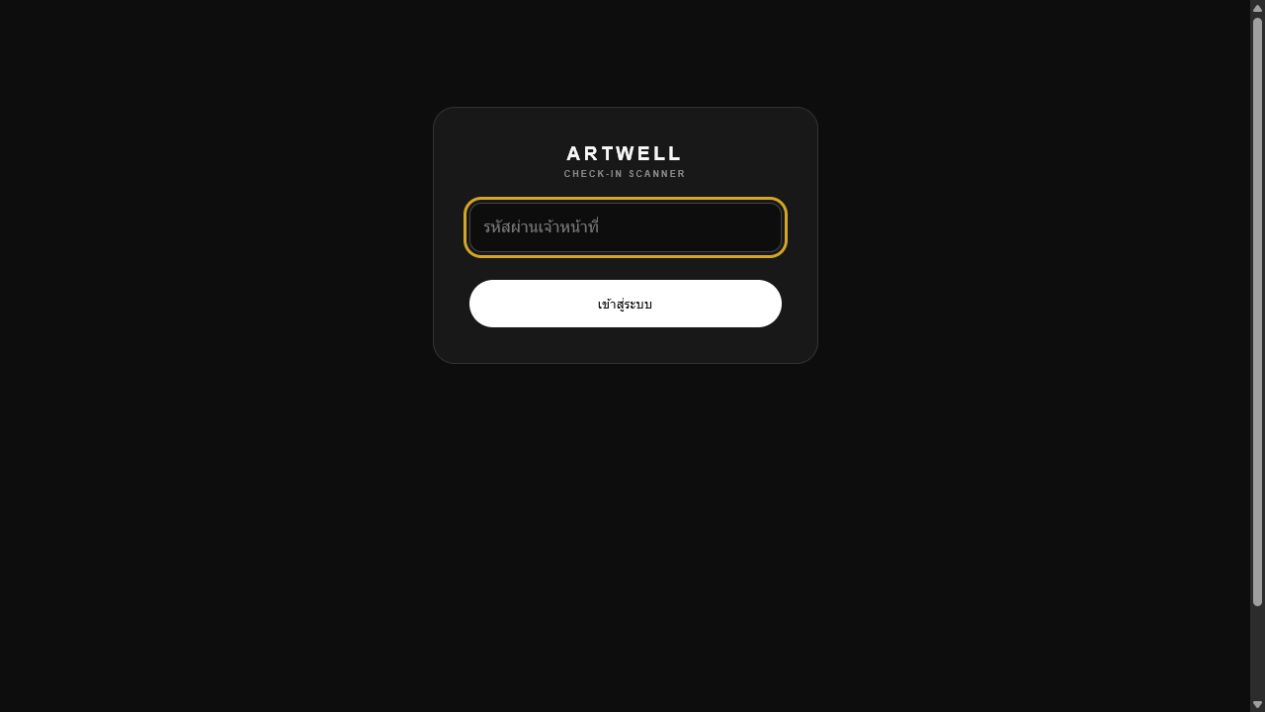
ฉันออกแบบจุดเช็กอินสำหรับ high-pressure environment ด้วย contrast สูง ปุ่มใหญ่ และผลลัพธ์ success/error ที่แยกชัด โดย protected Check-in Scanner entry ได้ deploy บน production แล้ว ส่วนข้อมูลจริงยังคงอยู่หลังการยืนยันตัวตนของ staff

Multiple scan methodsกล้อง, รูปภาพ และ token manual รองรับข้อจำกัดอุปกรณ์
Single-use logicalready checked-in เป็น state แยก ลดการตีความของเจ้าหน้าที่
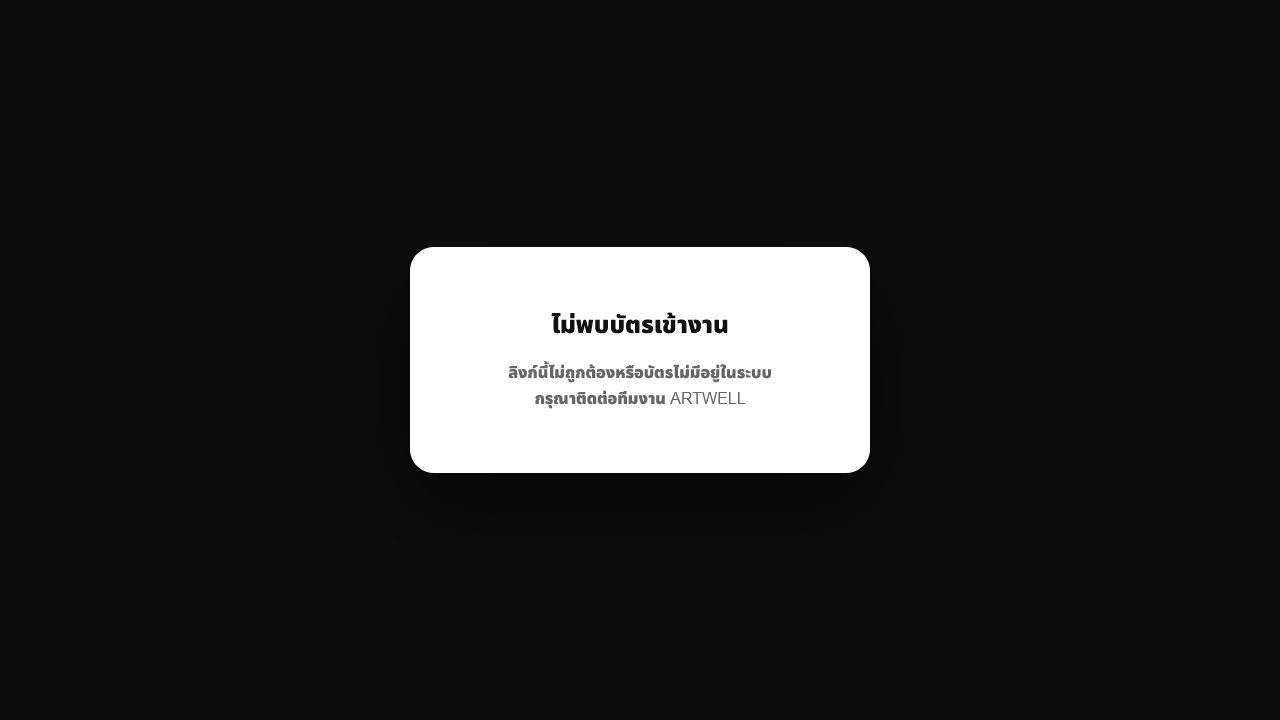
Secure ticket stateลิงก์ผิดหรือ ticket ไม่พร้อมใช้แสดง error page ที่ไม่เปิดเผยข้อมูล
ARTWELL check-in scanner staff login
Staff entryHigh-contrast authenticated surface
Invalid ARTWELL ticket error state
Error stateNo personal data disclosed
06 / ENGAGEMENT

Mind Reflection

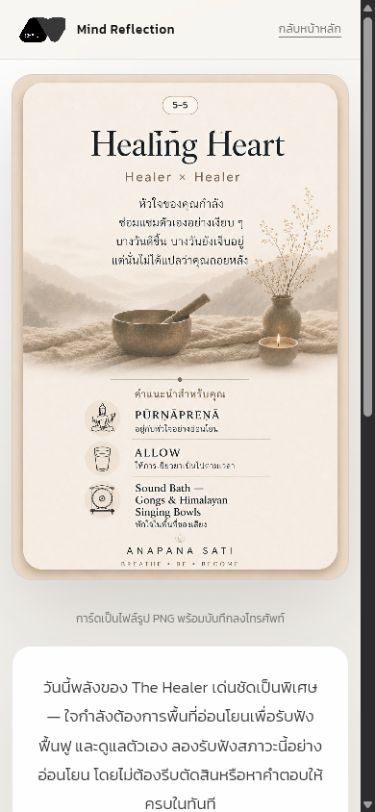
ฉันออกแบบแบบสะท้อนใจ 10 คำถามให้แปลงคำตอบเป็น 7 สภาวะและผลลัพธ์การ์ด 28 แบบ โดยวางกรอบให้เป็น self-reflection ไม่ใช่ diagnosis พร้อมบันทึกความคืบหน้าและแชร์ผลลัพธ์ได้

One question at a timeลด cognitive load และให้จังหวะที่สอดคล้องกับธีมนิทรรศการ
Transparent resultผู้ใช้เปิดดูคะแนนทั้ง 7 สภาวะได้ ไม่ใช่กล่องดำ
Portable artifactผลลัพธ์เป็น PNG ที่บันทึกหรือแชร์ได้ และต่อยอดไปยัง ritual recommendation
Mind Reflection mobile result showing Healing Heart card
Ethical framing

ข้อความผลลัพธ์ระบุว่า “นี่ไม่ใช่คำจำกัดความของตัวคุณ แต่เป็นเพียงภาพสะท้อนของใจในวันนี้” เพื่อไม่ทำให้แบบทดสอบถูกเข้าใจเป็นคำวินิจฉัยทางสุขภาพจิต

07 / PARTNERS

Media preview workflow

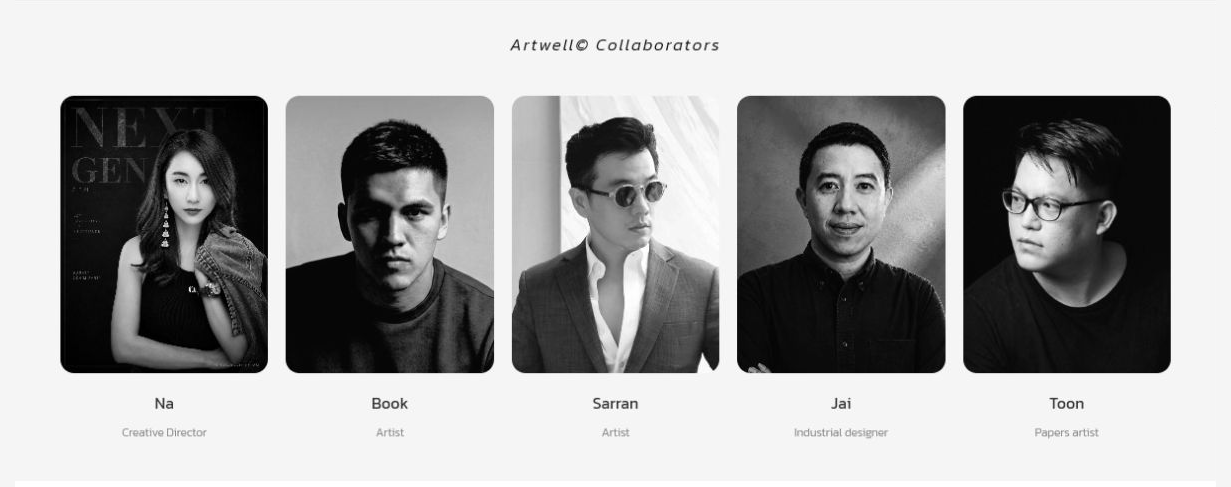
ฉันแยก media workflow ออกจาก visitor registration เพราะข้อมูล เป้าหมาย และสิทธิ์ต่างกัน แล้วออกแบบ flow ตั้งแต่ creator profile และ portfolio ไปจนถึง media pass เฉพาะบุคคล

Separate data modelไม่ยัดข้อมูล media ลงในฟอร์มผู้ชมทั่วไป
Professional contextเก็บข้อมูลเท่าที่จำเป็นต่อการคัดเลือกและประสานงาน
Dedicated passQR และอีเมลใช้ภาษา media preview เพื่อแยกสิทธิ์หน้างาน
ARTWELL collaborators section with five creative contributors
Partner contextClear role attribution across the creative ecosystem

Design system

One Brand Language
Two Levels of Density

ระบบภาพใช้ monochrome เป็นฐานและใช้สีอย่างมีหน้าที่: ทองสำหรับ focus/attention, เขียวสำหรับ verified, แดงสำหรับ error และสีหมวดหมู่สำหรับกิจกรรม

01

Editorial for emotion

พื้นที่กว้าง ภาพเต็มเฟรม ตัวอักษร contrast สูง และจังหวะ scroll สำหรับหน้าสาธารณะ

02

Structured for action

steps, summaries, labels และ explicit states สำหรับ transaction และ admin

03

Calm, never vague

คงน้ำเสียงสงบ แต่ข้อความสถานะและ action ต้องตรงไปตรงมาเสมอ

Core visual tokens

INK
#11110F
PAPER
#F3F2ED
FOCUS
#D4A918
SUCCESS
#2E6B4B
ARTWELL
กลับมาอยู่กับตัวเอง

Reusable components

01
Activity chipCategory + semantic color + text label
02
Capacity badgeAvailable · Limited · Full · Unavailable
03
Step sectionNumber, title, inputs and validation hint
04
Status badgePending · Approved · Rejected · Checked-in
05
Booking rowFixed fields, slip link and admin actions
06
Feedback panelSuccess, error and safe recovery path

State design

Designing
the In-Between States

ระบบจริงไม่ได้มีเฉพาะ happy path ตารางนี้แสดง state สำคัญที่มีผลต่อความเชื่อมั่น การตัดสินใจ และความปลอดภัยของบริการ

SurfaceStateUser-facing behaviorDesign purpose
CalendarLoadingแสดงว่ากำลังตรวจสอบจำนวนที่ว่างไม่ตีความข้อมูลเก่าเป็น availability ปัจจุบัน
SessionFullปิดปุ่มจองและระบุยอดจองเต็มป้องกัน dead-end หลังกรอกฟอร์ม
DiscountValidยอดเป็นศูนย์และซ่อนส่วนแนบสลิปลดขั้นตอนที่ไม่จำเป็น
PaymentPending reviewแสดง reference และรอเจ้าหน้าที่ตรวจตั้งความคาดหวังให้ตรงกับ manual process
TicketApprovedเปิด QR ticket และส่งอีเมลออกสิทธิ์เมื่อเงื่อนไขครบเท่านั้น
TicketInvalidไม่แสดงข้อมูลส่วนตัวและแนะนำให้ติดต่อทีมปลอดภัยและมี recovery path
Check-inAlready usedแจ้งว่าเช็กอินแล้วพร้อมเวลาที่เกี่ยวข้องป้องกันการใช้บัตรซ้ำและลดข้อโต้แย้ง
AdminEmptyแสดง empty message แทนตารางเปล่าบอกว่าสถานะปกติ ไม่ใช่ระบบเสีย

Responsive & visual QA

Validated on Real Screens
Beyond the Mockup

งานถูกตรวจด้วย screenshot หลาย viewport และหลายสถานะ โดยเน้น text fit, hierarchy, comparison density, interaction state และ page-level overflow

Focused before and after comparison of discount code administration

Focused comparison

เปรียบเทียบข้อมูลชุดเดียวกันเพื่อประเมิน scanability และ alignment ไม่ใช้ความรู้สึกจากภาพรวมเพียงอย่างเดียว

Mobile admin discount code list

Mobile transformation

แถวข้อมูลเปลี่ยนเป็น labeled summary โดย action ยังคงมองเห็นและไม่มี horizontal overflow ระดับหน้า

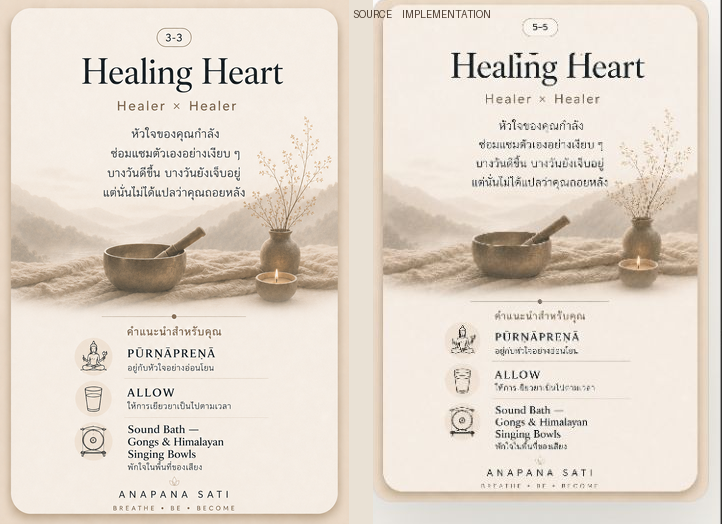
Mind Reflection card visual comparison

Artifact fidelity

ตรวจสัดส่วนการ์ด การอ่านตัวอักษร และความสอดคล้องระหว่างหน้าจอกับไฟล์ PNG ที่ผู้ใช้บันทึก

Responsive desktop / mobile
No clipped or overlapping text
44px minimum touch targets
Keyboard focus visibility
Status not communicated by color alone
Empty, error and disabled states
Thai / English text fit
Operational data alignment

Post-launch measurement

How Stakeholders
Can Measure Value

ระบบเผยแพร่บน production แล้วและตรวจสอบได้ทั้ง public experience กับ protected staff entry แต่ยังไม่มี analytics result ที่ยืนยัน outcome ฉันจึงแยก “launch evidence” ออกจาก “performance metrics” เพื่อไม่อ้างผลลัพธ์เกินข้อมูลที่มี

01

Visitor Value

ผู้ชมเข้าใจงาน ลงทะเบียน และวางแผนจากปฏิทินกิจกรรมได้โดยลดการสอบถามทีมงานระหว่างทาง

02

Operational Value

ทีมงานเข้าถึง registration workspace และ check-in tool ผ่าน protected entry ที่แยกจาก public experience

03

Business & Brand Value

ประสบการณ์รักษาภาพลักษณ์ ARTWELL พร้อมสร้างฐานข้อมูลและโครงสร้างที่ใช้ซ้ำใน edition ถัดไป

ObjectiveMetric to trackWhy it mattersStakeholder
Discovery qualityHero-to-calendar / registration click-throughบอกว่า storytelling พาผู้ชมไปสู่ practical action ได้หรือไม่Brand · Growth
Booking usabilityBooking completion and field-error rateวัด friction ของ flow และความชัดเจนของ validationAudience · Product
Session planningFull-session attempts preventedยืนยันว่า capacity feedback ลด dead-end ได้จริงAudience · Operations
Payment operationsMedian review time and rejection reasonsช่วยปรับหลักฐานที่ต้องใช้และ workflow ของเจ้าหน้าที่Finance · Operations
On-site efficiencyMedian check-in time and duplicate-scan incidentsวัดความเร็วและความปลอดภัยของ ticket flowOn-site team
Post-visit engagementMind Reflection completion and card sharesแสดงว่างานดิจิทัลต่อยอดประสบการณ์หลังนิทรรศการได้หรือไม่Brand · Community
Post-launch measurement gate

ขั้นถัดไปคือบันทึก baseline จาก production, ระบุ metric owner และกำหนดรอบ review ร่วมกัน เพื่อให้การออกแบบ iteration ถัดไปอ้างอิงพฤติกรรมจริงแทนสมมติฐาน

Recommendation

What This Work
Demonstrates

คุณค่าของงานนี้ไม่ได้อยู่ที่จำนวนหน้าจอ แต่อยู่ที่การทำให้ brand experience, transaction และ service operation ส่งต่อกันได้โดยไม่เกิดช่องว่าง พร้อมมีกรอบตัดสินใจสำหรับพัฒนาต่อ

Value Delivered

  • ฉันเปลี่ยนโจทย์เว็บไซต์นิทรรศการให้เป็น service ecosystem ที่มี production release จริง
  • ฉันวาง IA แยก public, transactional, operational และ partner pathways
  • ฉันส่งมอบ live exhibition story, registration, activity calendar, Mind Reflection และ protected staff entry
  • ฉันสร้างภาษาภาพที่ยืดหยุ่นตั้งแต่ immersive storytelling ถึง dense admin UI
  • ฉันสื่อสาร delivery status อย่างโปร่งใส โดยแยก live, protected และ staged scope

Recommended Next Phase

  • ติดตั้ง analytics และกำหนด production baseline ตาม success framework
  • เพิ่ม entry point ไป Activity Calendar จาก homepage เพื่อให้เส้นทาง discovery ต่อเนื่องขึ้น
  • ทำ moderated usability test กับ visitor และ staff ในสถานการณ์หน้างาน
  • ทำ production regression และ accessibility audit ด้วย screen reader
  • เปิด activity transaction routes เมื่อ payment, review และ recovery states ผ่าน acceptance criteria